
Register National Address (2026): Complete Guide to Online Registration in Saudi Arabia
Register National Address is the official process for creating a verified address in Saudi Arabia. It helps individuals, residents, businesses, and government entities access essential services through one standardized location. The Saudi National Address system, managed by Saudi Post (SPL), supports accurate deliveries, identity verification, and digital government services across the Kingdom.
National Address Registration is now an important part of daily life in Saudi Arabia. Banks, government platforms, healthcare providers, educational institutions, and online stores rely on a verified address. It also helps emergency services and delivery companies locate homes and businesses quickly. Many users complete the process through Nafath, which provides secure identity verification before registration.
Register National Address Checker
Check whether your National Address information is complete before registration.
Whether you are a Saudi citizen, an expatriate with an Iqama, a business owner, or an organization, you may need to Register National Address Online to meet official requirements and access various public and private services. The registration process is simple when you prepare the required information and follow the correct steps.

This guide explains everything you need to know about SPL National Address Registration. You will learn who must register, the documents you need, how to complete registration online, how to verify and update your address, and how to download your National Address certificate. By the end, you will have a clear understanding of the entire registration process and how to avoid common mistakes.
What is Register National Address?
Register National Address is the official process of creating a verified address in Saudi Arabia. The system gives every home, apartment, office, and business a unique and standardized address. It helps identify locations accurately across the Kingdom.
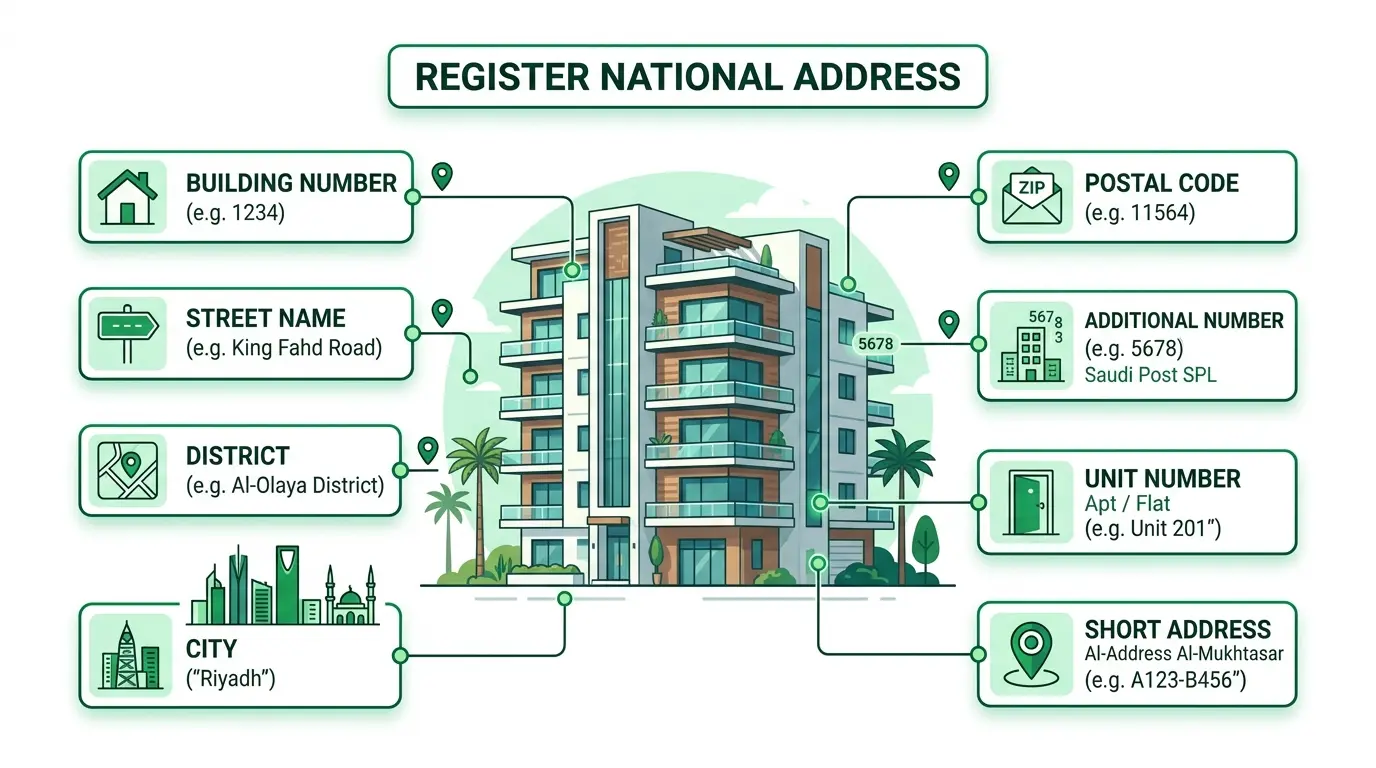
The National Address follows international postal standards and supports Saudi Arabia’s digital transformation. Each registered address includes a Building Number, Street Name, District, City, Postal Code, Additional Number, and, when applicable, a Unit Number. Together, these details create a complete and reliable address.
Whether you register as an individual or a business, your address becomes an official record that many public and private organizations can recognize and verify.
Purpose
Saudi Arabia introduced the National Address system to improve location accuracy and deliver better public services. Before the system, many locations relied on informal directions. This made deliveries, emergency response, and government services less efficient.
Today, a registered address supports secure identity verification and faster service delivery. It also strengthens digital transactions, simplifies address validation, and helps organizations maintain accurate customer records. The system plays an important role in achieving the goals of Saudi Vision 2030, which focuses on digital government and smarter public services.
Who Manages the National Address?
Saudi Post (SPL) develops, manages, and maintains the National Address system. SPL provides the official platform for SPL National Address Registration, address updates, verification, and certificate downloads.
Users can Register National Address Online through the SPL portal after completing secure identity verification with Nafath. This process helps protect personal information and ensures that every registered address belongs to the correct individual or organization.
Why It Matters
A verified National Address supports many essential services across Saudi Arabia. It serves as an official proof of address for both individuals and businesses.
Government agencies use it to deliver digital services and verify identities. Banks rely on it during Know Your Customer (KYC) checks and account opening. E-commerce companies use it to improve delivery accuracy and reduce shipping delays. Hospitals and healthcare providers use verified addresses to maintain accurate patient records and communicate important information. Schools and universities also use registered addresses during admissions and administrative processes.
A complete and verified National Address saves time, improves accuracy, and creates a trusted foundation for secure digital services throughout Saudi Arabia.
Who Must Register a National Address?
National Address registration applies to individuals and organizations across Saudi Arabia. Each group has specific requirements based on its legal status and purpose. Registering an accurate address helps access government and private services without delays.
Saudi Citizens
Saudi citizens should register their National Address using a valid National ID. They can complete the process online through Saudi Post (SPL) after verifying their identity with Nafath. Citizens should register their primary residence and update the address whenever they move.
Residents (Iqama Holders)
Residents with a valid Iqama should also complete National Address registration. A registered address supports banking, healthcare, education, and many government services. Residents must provide accurate address details and verify their identity before submitting the application.
Expatriates
Expatriates living in Saudi Arabia can register a National Address if they hold a valid Iqama. The process is similar to that for residents. A verified address helps access essential services, receive deliveries, and complete official transactions with confidence.
Businesses
Companies, establishments, and branch offices must register an official business address. Businesses usually register using a valid Commercial Registration (CR) and authorized company details. An accurate National Address supports licensing, tax compliance, banking, logistics, and communication with government authorities.
Government Organizations
Government entities also maintain an official National Address for their offices and facilities. A standardized address improves coordination between agencies and helps citizens locate public offices with ease. It also supports digital government initiatives and efficient service delivery.
Benefits of Registering a National Address
Registering a National Address offers more than a postal location. It creates a trusted digital identity that supports everyday life and business operations throughout Saudi Arabia.
Official Proof of Address
A verified National Address serves as an official proof of residence or business location. Many public and private organizations accept it during identity and address verification.
Simplified Banking and KYC
Banks use the National Address during Know Your Customer (KYC) procedures. A verified address helps open new accounts, apply for financial services, and complete identity checks more efficiently.
Faster and More Accurate Deliveries
Delivery companies rely on the National Address to locate homes and businesses. Accurate address details reduce delivery errors and improve shipping speed.
Easy Government Transactions
Many government services require a verified National Address. Keeping your address updated helps complete applications, receive official notices, and access digital services without unnecessary delays.
Integration with Absher
Several government platforms, including Absher, use verified address information during selected services. An accurate National Address supports smoother identity verification and service processing.
Secure Nafath Authentication
Nafath provides secure digital identity verification during registration. This process helps protect personal information and ensures that the registered address belongs to the correct user.
Better Business Compliance
Businesses benefit from an official registered address when dealing with regulatory authorities, financial institutions, suppliers, and customers. It also supports commercial registration, official correspondence, and operational transparency.
Improved Emergency Response
Emergency services depend on accurate location information. A verified National Address helps responders identify the correct property quickly, reducing response times during urgent situations.
Requirements Before Registration
Preparing the required information before you start makes the registration process faster and smoother. Make sure all details are accurate to avoid verification delays or application errors.
National ID
Saudi citizens need a valid National ID to register a National Address. The information on your ID should match your personal records. Any mismatch may delay identity verification.
Iqama
Residents and expatriates need a valid Iqama. The Iqama confirms your legal residency and allows you to complete identity verification through the official registration process.
Mobile Number
Use an active Saudi mobile number registered in your name whenever possible. You will receive verification codes and important registration updates on this number.
Nafath Account
You need a verified Nafath account to confirm your identity securely. Nafath protects your personal information and allows you to access Saudi digital government services safely.
Accurate Property Location
Choose the exact location of your home or business on the map. A precise location helps delivery companies, government agencies, and emergency services find your property without confusion.
Building Number
The Building Number identifies your property within the National Address system. Always enter the correct number displayed on the building or provided through official address records.
Postal Code
The Postal Code identifies your delivery area. Enter the correct code to ensure successful mail delivery and accurate address verification.
Additional Number
The Additional Number provides extra location accuracy. It works with the Building Number and Postal Code to create a complete and unique National Address.
How to Register National Address Online (Step-by-Step)
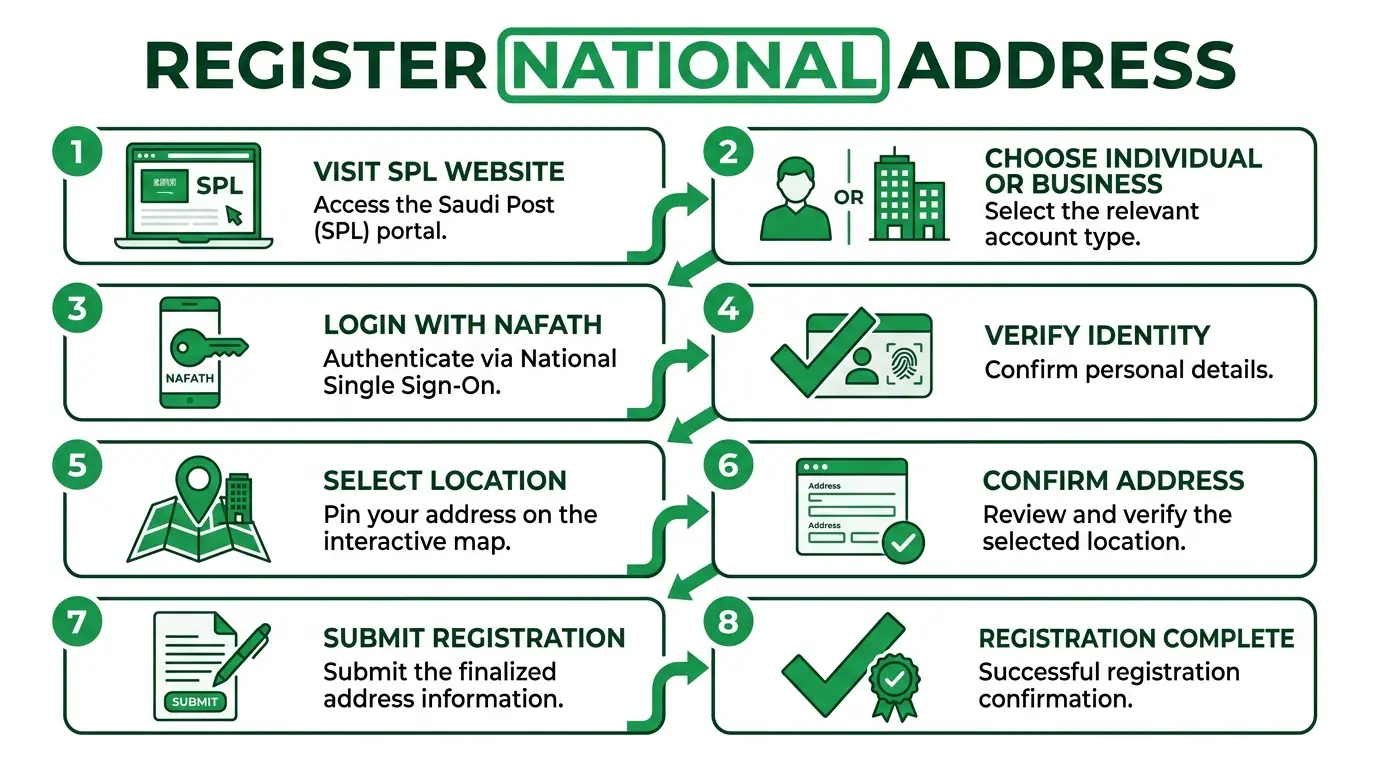
You can complete Register National Address Online in just a few minutes through the official Saudi Post (SPL) platform. Follow these steps carefully to avoid common registration errors.
Step 1: Visit the SPL Website
Open the official Saudi Post (SPL) National Address portal. Select the National Address Registration service to begin your application.
Step 2: Choose Individual or Business
Select the option that matches your situation. Choose Individual if you are registering a personal address. Choose Business if you are registering a company, branch, or organization.
Step 3: Log In with Nafath
Sign in using your Nafath account. Secure authentication verifies your identity before you can continue with the registration.
Step 4: Verify Your Identity
Approve the identity verification request through Nafath. Once verified, the system automatically retrieves your basic personal information.
Step 5: Select Your Location
Search for your property or pinpoint it on the interactive map. Make sure the selected location matches your actual residence or business.
Step 6: Confirm Your Address Details
Review all address components carefully. Check the Building Number, Street Name, District, City, Postal Code, Additional Number, and Unit Number, if applicable. Correct any mistakes before moving forward.
Step 7: Submit Your Registration
After reviewing the information, submit your application. The system processes your request and records your official National Address.
Step 8: Receive Registration Confirmation
Once your application is approved, you will receive a confirmation message. Your National Address becomes available for verification, future updates, and certificate downloads through the SPL platform.
Register National Address Using Nafath
Nafath provides a secure way to verify your identity during the National Address registration process. It connects your digital identity with government services, making registration faster and more reliable. You do not need to create separate verification credentials when you use Nafath.
Login Process
Start by visiting the official Saudi Post (SPL) National Address portal. Select the registration service and choose to sign in with Nafath. Enter your required details and continue to the authentication step.
Authentication
After signing in, Nafath sends an authentication request to your registered account. Review the request and approve it to continue. Once approved, the system securely connects your identity with the National Address platform.
Security
Nafath uses secure identity verification to protect your personal information. It helps prevent unauthorized access and reduces the risk of identity fraud. Always sign in through the official SPL and Nafath platforms. Never share your login credentials or one-time verification codes with anyone.
Identity Verification
After successful authentication, the system verifies your identity automatically. Your verified information allows you to continue with Register National Address Online without entering the same personal details repeatedly. This process improves accuracy and speeds up registration.
Register National Address for Businesses
Every business operating in Saudi Arabia should maintain an official National Address. A registered business address supports regulatory compliance, government communication, banking services, and commercial operations. It also builds trust with customers, suppliers, and business partners.
Commercial Registration (CR)
Businesses should have a valid Commercial Registration (CR) before completing National Address registration. The CR confirms the legal identity of the company and links the official address to the business record.
Company Address
Register the company’s physical location accurately. Enter the correct Building Number, Street Name, District, City, Postal Code, and Additional Number. Accurate information helps government agencies, financial institutions, and logistics providers identify your business without errors.
Office Address
Businesses with a single office should register the address where daily operations take place. This address becomes the official location for correspondence, inspections, deliveries, and many government services.
Branch Registration
Companies with multiple branches should register each branch separately when required. Every branch should have its own verified National Address based on its physical location. Keeping branch addresses updated improves operational efficiency and supports accurate service delivery across Saudi Arabia.
Register National Address for Expats
Expatriates living in Saudi Arabia can register a National Address through the official Saudi Post (SPL) platform. A registered address helps access government services, banking, healthcare, online shopping, and many other essential services.
Iqama
A valid Iqama is required to register a National Address. The personal details on your Iqama should match your official records. This helps complete identity verification without delays.
Required Documents
Before you begin, prepare the following information:
- Valid Iqama
- Active Saudi mobile number
- Verified Nafath account
- Accurate residential address
- Building Number
- Postal Code
- Additional Number
Providing accurate information improves the chances of successful registration on the first attempt.
Verification
After submitting your application, complete identity verification through Nafath. The system confirms your identity and links your official address to your personal record. Review every address detail carefully before submitting the application.
Mobile Registration
You can complete most of the registration process using your smartphone. Open the official SPL website, sign in with Nafath, verify your identity, and follow the registration steps. A stable internet connection and access to your registered mobile number make the process easier.
National Address Components Explained
Every National Address contains several standardized elements. Each component helps identify a property accurately and supports reliable navigation, deliveries, and government services.
Building Number
The Building Number is a unique four-digit number assigned to a specific property. It identifies the exact building within a street.
Street Name
The Street Name identifies the road where the property is located. Enter the official street name exactly as shown on municipal records.
District
The District identifies the neighborhood within a city. It helps narrow the location and improves address accuracy.
City
The City specifies the municipality where the property is located. Always select the correct city during registration.
Postal Code
The Postal Code identifies the postal delivery zone. It helps postal services and courier companies deliver mail and parcels efficiently.
Additional Number
The Additional Number is a four-digit location identifier. It works with the Building Number and Postal Code to improve location precision.
Unit Number
The Unit Number identifies a specific apartment, office, or commercial unit within a building. Enter this number only if your property has multiple units.
Short Address
The Short Address is a simplified address code created by SPL. It combines letters and numbers into a short format that is easy to share during deliveries or when providing your location.
How to Verify National Address
After completing your registration, you should verify your National Address to ensure all information is accurate and active. Verification confirms that your address is officially recorded in the SPL system.
Verification Methods
You can verify your National Address through the official SPL portal after signing in. The platform displays your registered address and related details.
Check Address Status
Review your registration status to confirm that your address is active. If the status shows pending or incomplete, follow the instructions provided to complete the process.
Address Validation
Check every address component carefully. Confirm the Building Number, Street Name, District, City, Postal Code, Additional Number, and Unit Number. Correct information helps prevent service interruptions.
Address Lookup
You can use the SPL platform to locate and review your registered National Address. This feature helps confirm that the address stored in the system matches your actual residence or business location.
How to Download and Print National Address Certificate
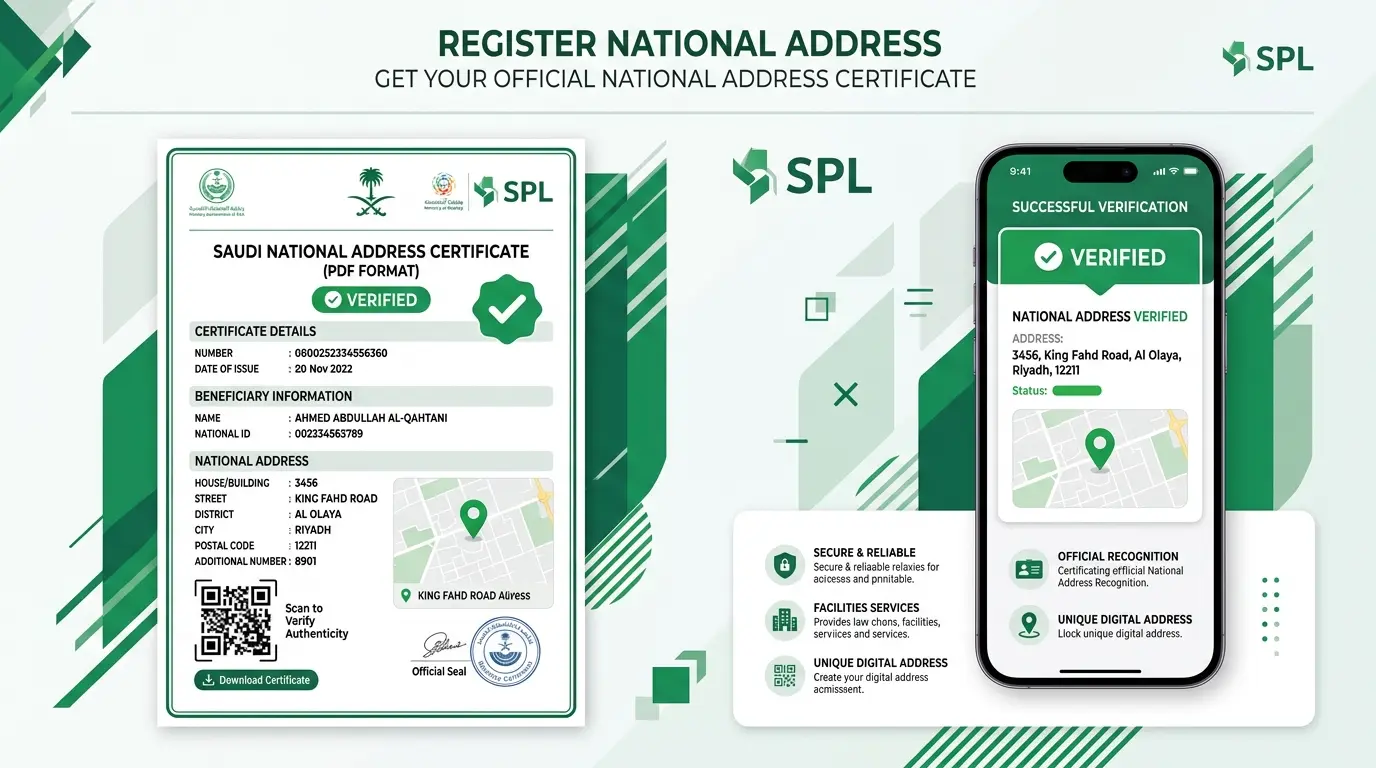
The National Address Certificate serves as official proof of your registered address. Many government agencies, banks, employers, and private organizations may request this document during different transactions.
Download the Certificate as a PDF
Sign in to the official SPL portal and open your National Address account. Select the option to download your National Address Certificate. Save the certificate in PDF format for future use.
Use as Official Proof of Address
The certificate confirms your registered address in the official National Address system. It is widely accepted as proof of residence or business location during identity verification and administrative procedures.
When You May Need the Certificate
You may need the National Address Certificate when:
- Opening a bank account
- Applying for government services
- Completing employment requirements
- Registering a business
- Verifying your address with service providers
- Submitting official documents that require proof of address
Keeping a recent copy of your certificate helps you complete these processes quickly and confidently.
Common Registration Problems and Solutions
Most users complete National Address Registration without difficulty. However, a few common issues can delay the process. The table below explains the problem, the possible cause, and the recommended solution.
| Problem | Cause | Solution |
| OTP not received | Network issue or mobile delay | Wait a few minutes and request a new OTP. Confirm your mobile number is active. |
| Wrong Building Number | Incorrect address information | Edit the address and enter the correct Building Number before submitting. |
| Login issue | Nafath authentication problem | Sign in again through Nafath and complete the authentication request. |
| Verification failed | Identity information does not match | Review your National ID or Iqama details and try again. |
| Address not found | Incorrect map location or mapping issue | Select the correct property location on the map and update the address details. |
If the problem continues, contact Saudi Post (SPL) customer support through the official channels for further assistance.
National Address Registration Tips
Following a few simple practices can help you complete the registration successfully on your first attempt.
- Use only official documents during registration.
- Verify your property location on the interactive map.
- Check the Building Number, Street Name, and District carefully.
- Double-check the Postal Code and Additional Number.
- Use an active Saudi mobile number for verification.
- Complete identity verification through Nafath.
- Review all information before submitting the application.
- Update your National Address whenever you move to a new home or office.
- Keep your registration details accurate to avoid problems with banking, government services, and deliveries.
- Download your National Address Certificate after successful registration for future use.
Frequently Asked Questions
How do I register a National Address?
Visit the official Saudi Post (SPL) website, sign in through Nafath, verify your identity, enter your address details, and submit the registration.
Is National Address registration free?
Registration is generally available through the official SPL platform. Always check the latest information on the official website for any service updates.
Can expatriates register?
Yes. Expatriates with a valid Iqama can register a National Address after completing identity verification.
How long does registration take?
Most registrations take only a few minutes if you have the required documents and accurate address information.
Can businesses register?
Yes. Companies, establishments, and branch offices can register an official business address using their Commercial Registration (CR).
Can I change my address later?
Yes. You should update your National Address whenever you move to a new residence or business location.
Can I register multiple addresses?
Individuals usually maintain one primary residential National Address. Businesses may register multiple branch locations when required.
What documents are required?
The required information may include:
- National ID or Iqama
- Active Saudi mobile number
- Verified Nafath account
- Accurate property location
- Building Number
- Postal Code
- Additional Number
Can I print the National Address Certificate?
Yes. You can download and print the certificate from your SPL account after your registration becomes active.
Is Nafath required?
Yes. Nafath provides secure identity verification and helps protect your personal information during the registration process.
Conclusion
Register National Address is an essential step for anyone living or operating a business in Saudi Arabia. A verified National Address supports government services, banking, healthcare, education, e-commerce, and many other daily activities. It also provides an official proof of address that many organizations trust.
The registration process is straightforward. Prepare your documents, verify your identity through Nafath, confirm your address details, and submit your application through Saudi Post (SPL). After approval, verify your address and download your National Address Certificate for future use.
Finally, keep your National Address up to date whenever your residence or business location changes. Accurate information helps you receive uninterrupted government services, faster deliveries, and secure digital transactions across Saudi Arabia.